macOS + WINDOWS · FREE TIER FOREVER
Put your heartbeat
on the screen.
Connect any standard BLE heart rate strap and turn live BPM into a stream-ready overlay, a reviewable history, and annotations that keep the context. Start free — upgrade only if it earns a place in your workflow.
Free (Win) $0
·
Pro one-time $2.99 / ¥9.9
macOS + Windows
- BLE
- Standard HR service
- LIVE
- Real-time overlay
- OBS
- Single-window capture
- DATA
- Stored locally
128
BPMAerobic zone
Start recordingMark this
Standard BLE protocol
No account required
Data stays on device
OBS ready
English & Chinese UI
One-time purchase
01 — WHY PRO
A BPM number
shouldn't just be a number.
Most heart rate tools throw a value on the screen and stop there. Heart Rate Monitor Pro keeps device connection, on-screen expression, recording and context annotation in one unbroken chain — an overlay during the stream, a record that explains itself afterwards.
Live, and it reconnects
Scan and connect any standard BLE heart rate service. Drops recover automatically and your last device is one click away, so a stream never stalls because a strap blinked.
Straight into the stream
Number, heart, ECG or image. Keep the window always on top, or merge everything into one clean OBS capture source — no green screen, no plugins.
Remember why it changed
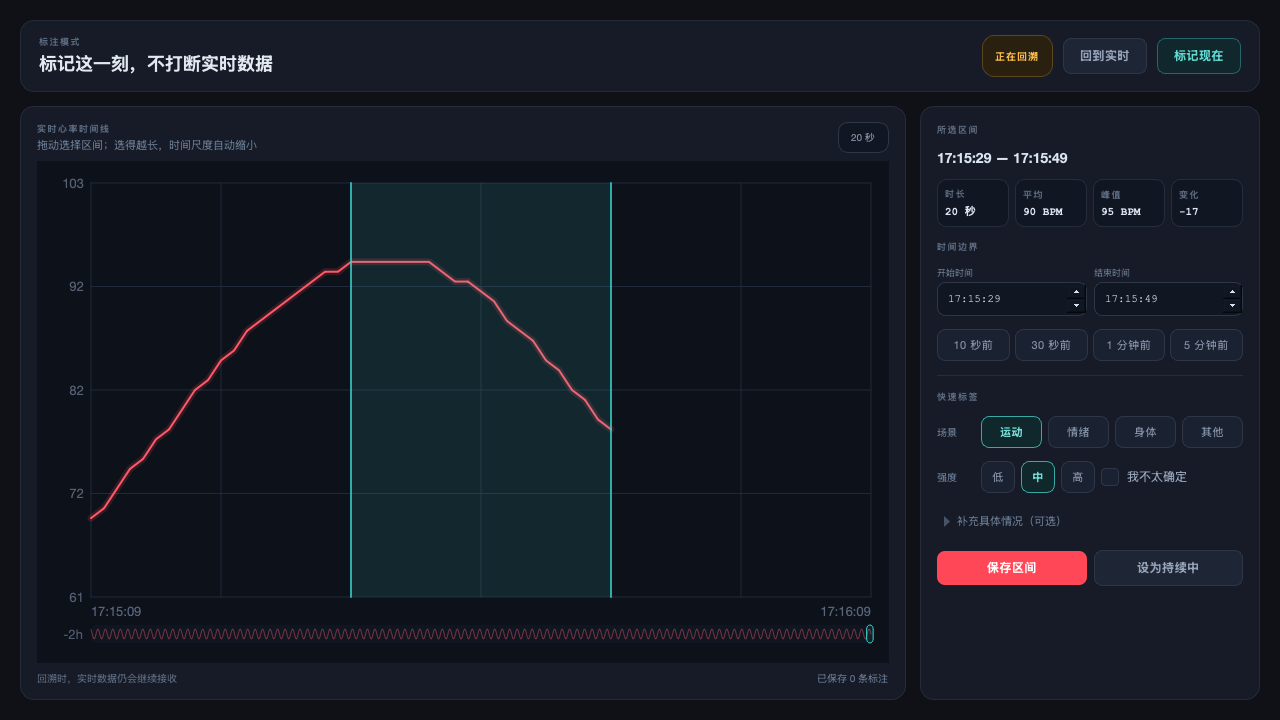
"Mark this" rewinds the last 20 seconds. Review the curve, drag a range, tag scene and intensity — while live data keeps arriving the whole time. Nothing gets dropped.
02 — FREE VS PRO
The free tier is a real tool.
Pro is the creator tier.
Connecting, live display and OBS capture are fully open in the free tier — no watermark, no time limit. Pro unlocks continuous BPM recording + CSV export, styling freedom, annotation capacity and the desktop pet toolchain.
| Capability | Free · $0 | Pro · $2.99 one-time |
|---|---|---|
| Connect a standard BLE heart rate device, live BPM | Included | Included |
| Live heart rate curve and zone display | Included | Included |
| OBS capture window (single-window streaming) | Included | Included |
| Continuous BPM recording + daily CSV export | No | Included |
| English and Chinese interface | Included | Included |
| Overlay visual styles | Fan chart / simple heart / number / Mochi | All 6 (including image / ECG) |
| Overlay layout tuning (drag, size, font, zone colours) | Included | Included |
| "Mark this" interval annotations | 3 per day | Unlimited |
| Mochi desktop pet live heart rate reactions | Idle motion only | All 9 motions |
| Video sprite tool (built into the app, turn a video into your own pet) | Not included | Fully open |
| Commercial and streaming use | Allowed | Allowed |
| Future updates | Security fixes | All updates |
◆ means available on the free tier with limits. Free and Pro are two separate installers — the Pro build ships fully unlocked with no activation code to enter. Both editions share the same data format, so switching later keeps your history.
03 — PRICING
One payment, both platforms.
No subscription, no auto-renewal, no per-device fee. $2.99 covers the macOS and Windows Pro builds.
$0Forever free
A fully usable heart rate display and logging tool — enough to connect your strap and find out whether the workflow fits.
- BLE device connection and live BPM
- Number / heart overlays, always on top
- OBS capture window, stream-ready
- English and Chinese interface
- Windows only (no macOS free tier)
- No continuous BPM recording or CSV export
- No image or ECG overlay styles
- 3 annotations per day, idle pet motion only
Download for Windows free
211 downloads
$2.99macOS + Windows
For streamers, content creators and anyone who takes their records seriously. Every overlay style, unlimited annotations and the full pet toolchain.
- macOS & Windows identical UI and build
- Continuous BPM recording + daily CSV export
- Everything in the free tier
- All 6 overlay styles (including image / ECG)
- Unlimited "Mark this" interval annotations
- All Mochi heart rate reaction motions
- Video sprite tool (built in; requires ffmpeg)
- All future updates
Buy Pro · $2.99 / ¥9.9
Already purchased? Get your build
macOS & Windows included
Payment and delivery: checkout is handled by a third-party platform (cards,
PayPal and local wallets supported). The Pro download link is delivered automatically to
your order page and inbox after payment. Digital goods — contact support within 7 days if a
functional issue can't be resolved and we'll refund you.
04 — INTERFACE COMPARISON
Interface & Edition Comparison
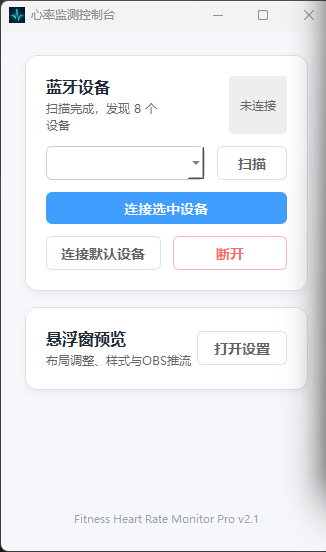
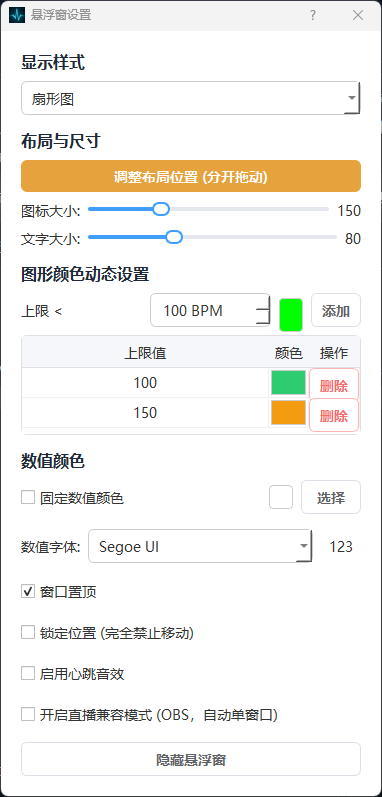
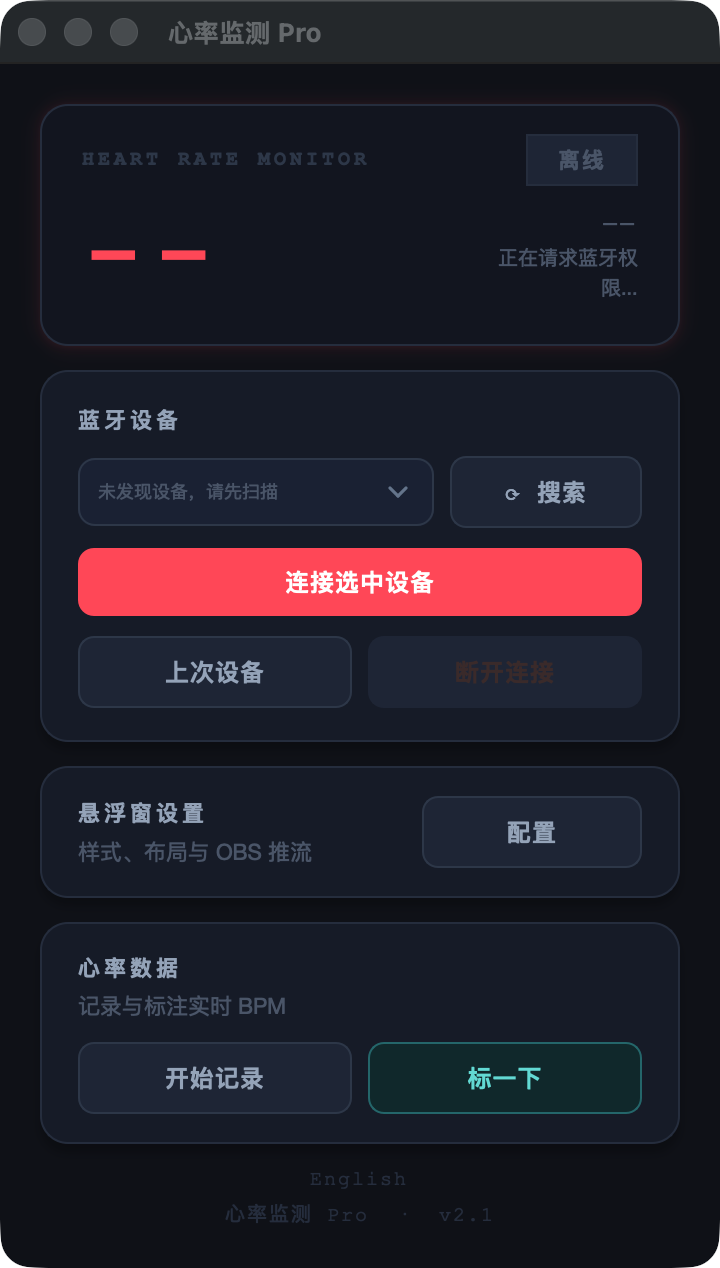
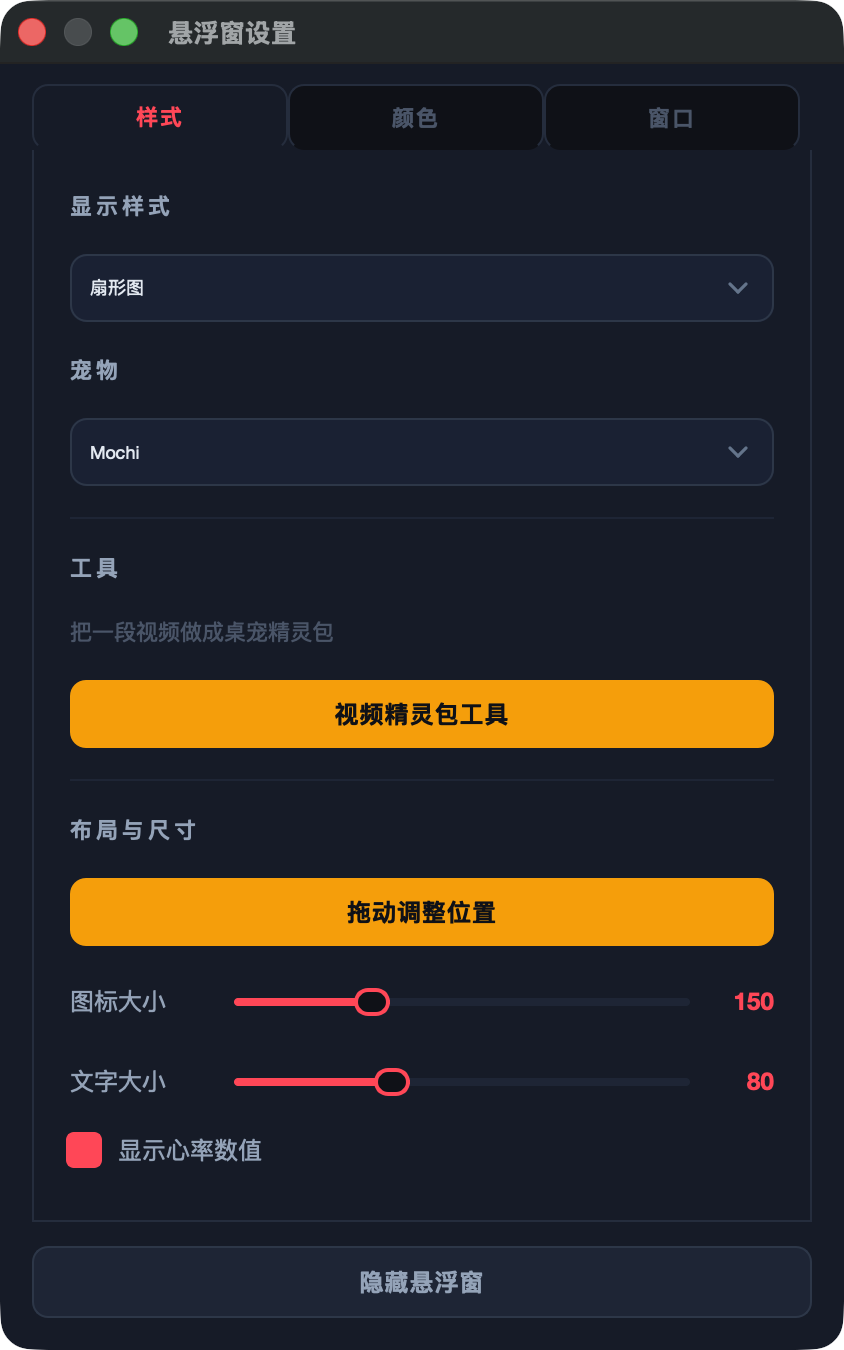
The Pro build delivers an identical UI and feature set across macOS and Windows. The free tier (Windows only) covers core streaming and logging.
Free edition
Windows only
Pro edition
macOS & Windows identical UI
Overlay and OBS
Windows can stay on top, be locked, or merge into a single capture source. ECG, plain number, heart or your own image — switch with the visual tone of the stream.
Data keeps flowing while you review
Live heart rate keeps arriving and being stored during annotation. Looking back never costs you the present.
Mochi reacts in real time
The desktop pet switches between idle, running, jumping and alerting as your heart rate crosses zones — signal-driven feedback, not a decorative sticker.
05 — HOW IT WORKS
Three steps from download to unlocked.
-
Try the free edition
Download the macOS or Windows installer. Connect your strap and see live BPM within minutes.
No account required. Nothing personal leaves your machine. -
Upgrade when it earns it
Hit "Buy Pro" to check out on the third-party platform with a card, PayPal or a local wallet.
$2.99 one-time. Not a subscription, no auto-renewal. -
Get your build, install over it
Your order page and inbox receive the Pro download link. Install over the free edition — history and settings are kept.
One licence covers both macOS and Windows.
06 — REQUIREMENTS
System requirements
Both platforms need a device that broadcasts the standard BLE heart rate service — a chest strap, or a watch with heart rate broadcasting enabled.
macOS
- OSmacOS 11 Big Sur or later
- ChipUniversal2 — runs natively on Apple Silicon and Intel Macs
- DeviceA device broadcasting the standard BLE heart rate service
- PermissionGrant Bluetooth access under System Settings → Privacy & Security → Bluetooth on first launch
- InstallDownload the
.dmg/.zipand drag it into Applications
Windows
- OSWindows 10 / 11 (64-bit)
- Chipx86_64
- DeviceA device broadcasting the standard BLE heart rate service
- PermissionAllow Bluetooth access for the app on first launch
- InstallDownload the installer and run it
07 — FAQ
What you might want to know first
Is the free edition a trial? Will it expire?
No and no. The free edition (Windows only) is a complete tool you can keep using indefinitely: device
connection, live BPM, overlays and OBS capture all work, with no watermark and no time limit. Continuous BPM recording + CSV export, styling freedom, annotation capacity, macOS support
and the pet toolchain are reserved for Pro.
Is Pro a one-time purchase or a subscription?
One-time $2.99. You keep the current major version permanently, including all minor
updates. There is no subscription and no auto-renewal, and we never store your payment
details.
Can I use one purchase on both Mac and Windows?
Yes. A single Pro licence includes both the macOS and Windows builds. Install it on both
of your machines — no second purchase needed.
Are Free and Pro separate installers? Do I need an activation code?
They are two separate installers. The Pro build ships with everything unlocked, so
there is no activation code to enter. Installing over your existing
folder keeps your recorded history and settings.
macOS says the app can't be verified — what should I do?
That's macOS blocking a notarized-less app, not a broken file. Fix: in Finder,
right-click the app and choose Open, then click Open again in the
dialog — macOS remembers the choice. If it still refuses, open System Settings →
Privacy & Security and click "Open Anyway" at the bottom.
Once we ship an Apple-notarized build, this step disappears.
Once we ship an Apple-notarized build, this step disappears.
Does it run on an Intel Mac?
Yes. The macOS build is a universal2 binary — the same download runs natively on both
Apple Silicon and Intel Macs, with no Rosetta needed. Requires macOS 11 or later.
Does the video sprite tool need anything extra?
It needs
ffmpeg and ffprobe on your machine:
brew install ffmpeg on macOS, winget install Gyan.FFmpeg on Windows.
The tool searches the usual install locations and tells you the command if it can't find them.
Which heart rate devices are supported?
Anything that broadcasts the standard BLE Heart Rate Service — Polar H10 / H9, Garmin
HRM, Wahoo TICKR, Coospo, Magene chest straps, and sports watches with heart rate
broadcasting enabled.
Note: Bluetooth BLE only. ANT+ receivers are not supported.
Note: Bluetooth BLE only. ANT+ receivers are not supported.
Can I use it without a heart rate strap?
No — the app doesn't measure heart rate itself. It turns the signal from a device you
already own into an overlay, a record and annotations. Any BLE chest strap works.
Is my heart rate data uploaded anywhere?
No. Everything stays on your own computer as local files (macOS: your Application
Support folder; CSV exports land there too). The app needs no account and works fine
offline.
Can I use it in OBS for streaming or screen recording?
Yes — that's one of the main use cases. The overlay can be set to always on top, or
merged into a single window and added to OBS as a window capture source. No green
screen or extra plugin required. The free tier supports this too.
How do I pay?
Payment is handled by a third-party platform and supports cards, PayPal and local
wallets. Delivery is automatic: your order page shows the download link, and you also
receive it by email.
What if I'm not happy after buying?
Digital goods: if you hit a functional problem we can't solve, contact
support within 7 days for a full refund. We
recommend trying the free edition first to confirm your device connects.
Do future versions cost extra?
All updates within the current major version are free. If a future major upgrade ships,
Pro owners get returning-customer pricing rather than being asked to pay full price
again.
Try it free on Windows. Upgrade to Pro for $2.99 / ¥9.9.
The free edition is permanent and complete. Confirm your strap connects and the overlay suits your stream — then upgrade for macOS + Windows.
Instant WeChat delivery / support via PaRa21D · one-time price for macOS and Windows